
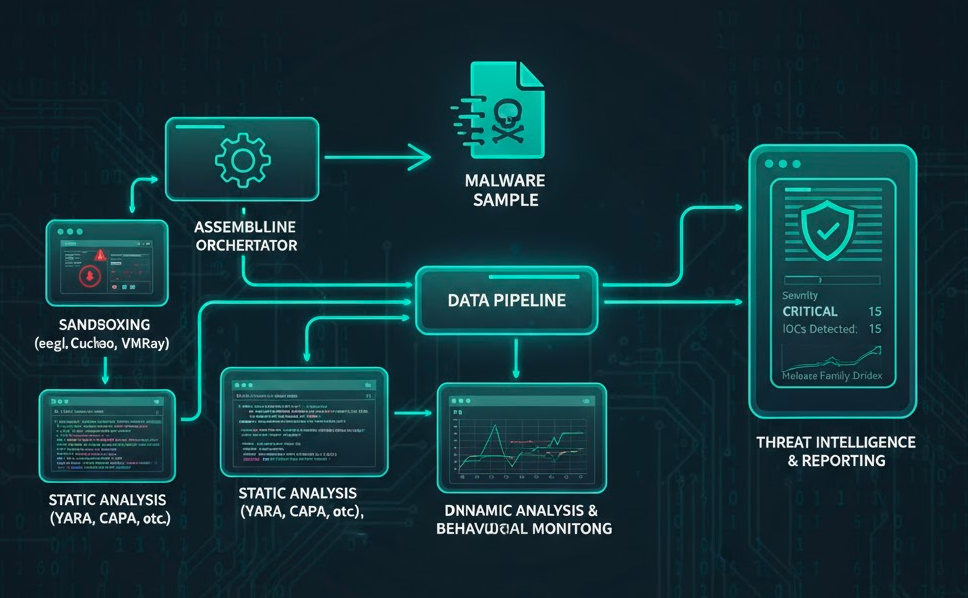
You need enterprise-grade malware analysis capabilities. Your organization cannot justify spending fifty thousand dollars annually on commercial platforms. This is a common problem for security teams working with limited budgets.
AssemblyLine solves this problem. It is a free open-source malware analysis framework developed by the Canadian Centre for Cyber Security. I deployed AssemblyLine 4 in my environment and want to share how it works in practice.
What AssemblyLine Provides
AssemblyLine functions like your own private VirusTotal. You maintain full control over your data. There are no per-sample fees. The platform includes over twenty analysis services.
- YARA rule matching for signature detection
- CAPA for capability analysis of executable files
- Multiple antivirus engines for detection coverage
- Static analysis for file characterization
- Network analysis for IOC extraction
- Behavioral analysis for understanding malware actions
- Sandboxing capabilities for dynamic analysis
The architecture scales from single-node deployments to distributed clusters. Government agencies use this platform in production environments. You pay zero licensing costs. The platform supports both on-premises and cloud deployments.
AssemblyLine integrates with existing security tools through REST APIs. You can submit samples programmatically and retrieve analysis results for integration with SIEM platforms. The web interface provides intuitive access to analysis reports and sample management.
Installation and Setup
I deployed AssemblyLine on a single-node appliance using Docker Compose. This approach works well for smaller security teams. The deployment process is straightforward but requires careful attention to security configuration.
System Requirements
- Linux host with Docker installed
- At least sixteen gigabytes of RAM for basic operations
- Thirty-two gigabytes or more for production deployments
- Adequate CPU resources for multiple concurrent analyses
Installation Steps
- Download official templates from github[.]com/CybercentreCanada/assemblyline
- Review configuration files including docker-compose.yml and environment files
- Configure environment variables for database connections, storage paths, and API keys
- Modify settings based on your security requirements and resource availability
- Run docker-compose up to start the services
- Monitor logs using docker-compose logs to ensure all services start correctly
- Verify all containers reach healthy status before submitting samples
Platform Components
- Core API server
- Web interface
- Worker nodes for analysis
- Database services
- Message queue systems
Each service communicates through defined network interfaces. Proper network configuration ensures secure communication between components.
Configuration and Best Practices
Network security is critical when analyzing live malware. Worker containers must run on isolated Docker networks with no internet access. This prevents malware from communicating with external command and control servers.
Network Security Configuration
- Configure Docker networks using internal driver mode for complete isolation
- Use iptables or firewalld to block outbound connections from worker containers
- Restrict SSH and GUI access to your management network only
- Implement network segmentation to separate analysis infrastructure from production systems
- Configure Suricata and Zeek to log all network attempts for review
Configuration Best Practices
- Start with minimal configuration and add services gradually
- Monitor CPU and memory usage during initial testing
- Scale resources based on your analysis workload
- Use dedicated storage volumes for better performance
- Implement backup procedures for analysis databases
- Set up API authentication before production use
- Generate API keys for programmatic access
- Implement rate limiting to prevent abuse
- Configure user roles and permissions based on team requirements
Use the official documentation for configuration guidance. The community provides support through GitHub issues and discussions. Regular updates from CCCS ensure you receive security patches and new features. Subscribe to release notifications to stay current with updates.
Real-World Analysis Example
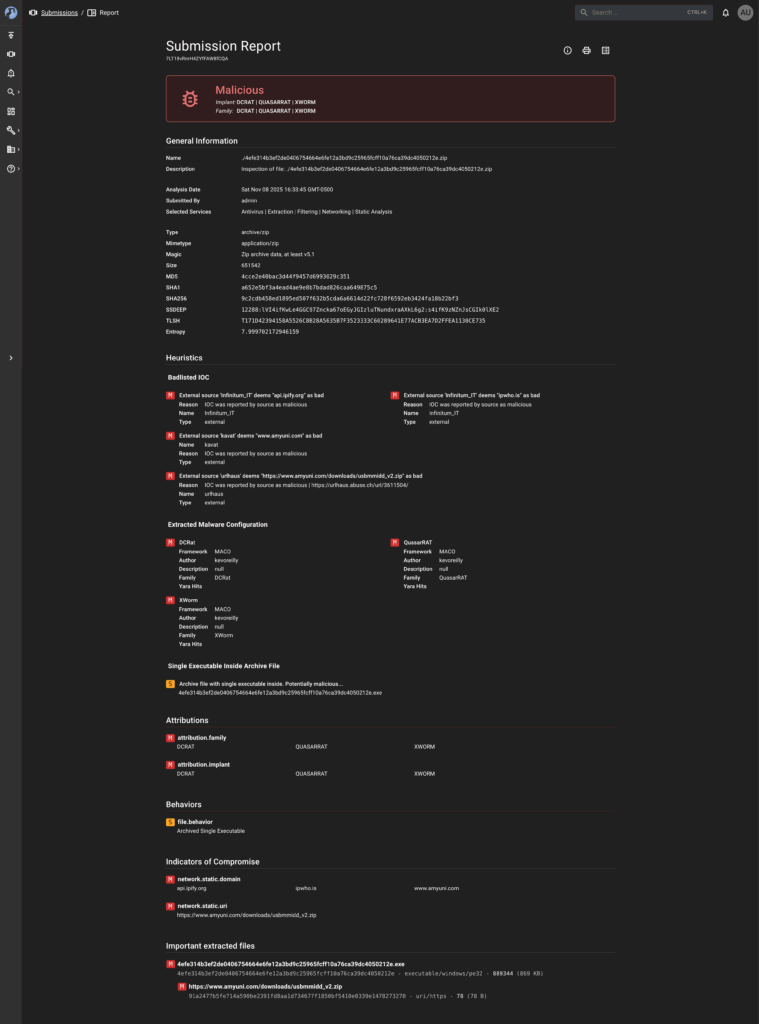
I analyzed a sample downloaded from MalwareBazaar. AssemblyLine identified three different RAT families in a single sample. The platform extracted configurations from DCRAT, QuasarRAT, and XWorm frameworks using automated analysis pipelines.
Sample Details
- File Type: ZIP archive containing a single executable
- File Size: 651,542 bytes
- Entropy: 7.999 indicating encryption or packing
- Verdict: Malicious
- SHA256: 9c2cdb458ed1895ed507f632b5cda6a6614d22fc728f6592eb3424fa18b22bf3
- MD5: 4cce2e40bac3d44f9457d6993029c351
- SHA1: a652e5bf3a4ead4ae9e8b7bdad826caa649875c5
Malware Families Detected
- DCRAT: Remote Access Trojan detected through signature matching
- QuasarRAT: Open-source RAT framework identified using framework-specific patterns
- XWorm: Remote Access Trojan detected through behavioral indicators
Indicators of Compromise
- Malicious Domains: api[.]ipify[.]org, ipwho[.]is, www[.]amyuni[.]com
- Malicious URL: hxxps://www[.]amyuni[.]com/downloads/usbmmidd_v2[.]zip
- Threat Intelligence Sources: Infinitum IT, kavat, urlhaus
Analysis Results
- Behavioral Pattern: Archived single executable indicating potential malware delivery
- SSDEEP Hash: 12288:lVI4ifKwLe4GGC97Zncka67oEGyJGIzluTNundxraAXkL6g2:s4ifK9zNZnJsCGIk0lXE2
- TLSH Hash: T171D42394158A5526C8B28A5635B7F3523333C60289641E77ACB3EA7D2FFEA1130CE735
- Configuration Framework: MACO framework usage across all three RAT families
- Author Identifier: kevoreilly found in extracted metadata
Analysis Services Used
- Antivirus scanning with multiple engines
- File extraction from archives
- Content filtering for suspicious patterns
- Network static analysis for IOC extraction
- Static analysis for file characterization
- YARA rule matching for signature detection
The entire process completed automatically in minutes without manual intervention. Results were available through the web interface immediately after completion.
Troubleshooting and Tips
Common Issues and Solutions
- Container startup failures: Check available memory and CPU resources, reduce worker containers if needed, monitor with docker stats command
- Database connection errors: Verify credentials in environment files, ensure database containers are running, review database logs
- Network configuration errors: Verify Docker network settings, test isolation by attempting external connections, use docker network inspect
- Analysis failures: Review service logs for specific failures, adjust timeout settings for large files, check for corrupted samples
- Storage space issues: Implement sample retention policies, configure automatic cleanup, monitor disk usage regularly
Configuration Tips
- Start with default settings and adjust gradually
- Monitor performance metrics to identify bottlenecks
- Add services incrementally to understand resource impact
- Keep configuration backups before making changes
- Join community discussions for help with specific scenarios
- Review GitHub issue tracker for known problems and solutions
Why This Matters
AssemblyLine provides enterprise-grade functionality at zero cost. Small and medium-sized organizations can deploy professional malware analysis capabilities without breaking budgets.
Key Benefits
- Zero licensing costs compared to fifty thousand dollars annually for commercial platforms
- Complete data privacy with samples staying in your environment
- No vendor lock-in or usage limits
- Full customization by adding your own analysis services
- Valuable learning experience understanding how analysis works
- Production-ready platform used by government agencies
Ideal For
- Small and medium-sized organizations
- Security teams building internal capabilities
- Researchers and students
- Anyone wanting to learn malware analysis
Getting Started
Initial Setup
- Visit the official repository at github[.]com/CybercentreCanada/assemblyline
- Review documentation for detailed installation instructions
- Download Docker Compose templates for your deployment
- Clone the repository to access all configuration files and examples
- Ensure your Linux host meets minimum requirements
- Install Docker and Docker Compose
- Verify Docker installation using docker version command
- Test Docker Compose functionality before proceeding
Deployment Steps
- Review installation documentation thoroughly
- Understand each component before deployment
- Test deployment in a non-production environment first
- Allocate sufficient resources for your analysis workload
- Configure network isolation and firewall rules before analyzing live malware
- Verify all services start correctly
- Create initial admin user accounts through the web interface
Service Configuration
- Enable YARA scanning for signature detection
- Activate CAPA analysis for executable capability assessment
- Configure antivirus engines for detection coverage
- Enable network analysis for IOC extraction
- Configure additional services based on your needs
Integration and Usage
- Generate API keys through the web interface
- Connect AssemblyLine to your SIEM or security stack via REST APIs
- Automate sample submission and retrieve results programmatically
- Submit files through the web interface or API
- Review comprehensive analysis results
- Use extracted indicators of compromise for threat hunting and incident response
- Export analysis reports for documentation and sharing
Ongoing Maintenance
- Set up alerts for analysis failures
- Monitor resource usage to ensure adequate capacity
- Review analysis statistics regularly to understand usage patterns
- Keep the platform updated with latest releases
AssemblyLine proves that open-source solutions can provide professional security capabilities. You do not need massive budgets to build effective security operations. The right tools and approach make enterprise-grade analysis accessible to any security team. Start with a basic deployment and expand capabilities as needed.